







Cookies help us deliver our services. By using our services, you agree to our use of cookies.



Acoyer
Acoyer
Displayper page
Sort by
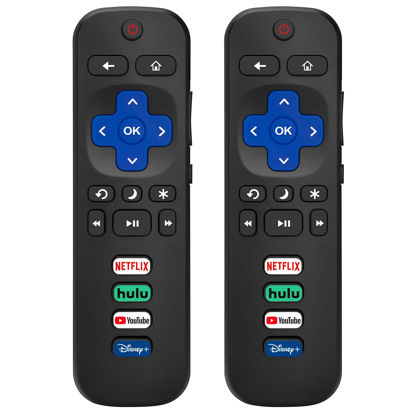
(Pack of 2) Replacement Remote Control Only for Roku TV, Compatible for TCL Roku/Hisense Roku/Onn Roku/Philips Roku Smart TVs(Not for Stick and Box)
PACKAGE LNCLUDED: Pack of 2 remote. Two-pack remote control can solve your home backup remote control needs. Infrared remote no pairing or programming needed. Just Insert 2 Pcs*AAA batteries to get it work(Batteries and manual are not included) | EXACT COMPATIBILITY: Acoyer Remote control Only for Roku Series TV, Compatible with TCL Roku TV, Hisense Roku TV, Onn Roku TV, Sharp Roku TV, Element Roku TV, Westinghouse Roku TV, Philips Roku TV, Insignia Roku TV, JVC Roku TV, RCA Roku TV, Hitachi Roku TV and Sanyo Roku TVs Series. | NOT APPLICABLE: TV Remote is NOT Compatible with Roku Stick, Roku Streaming Stick, Roku Box 1/2/3/4(HD/LT/XS/XD), Roku Ultra, Roku Express, Roku Premiere or Roku Player. | SHORTCUT BUTTONS: Get to favorite apps quickly with shortcut buttons and it have 4 shortcuts buttons (Disney, Netflix, YouTube, Hulu). Precisely control far from 10 meters/30 feet and it supports over total 160,000 clicks for all buttons via approved tests. | AFTER SALE SERVICE: Acoyer Remote controls with an unlimited return and refund service in 60 days. If you have any questions or concerns regarding your order, please feel to reach out to us.
₹1,358.55
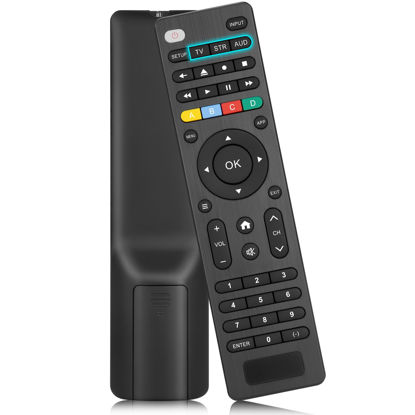
Universal-TV-Remote-Control Compatible with Samsung/LG/Vizio/TCL/Hisense/Sony/Philips/Sharp and More Brand Smart TVs,Streaming Players,Sound Bar Audio and DVD/Blu-ray Players
【All In One Remote】Universal remote control is compatible with of audio and video devices, including TVs, DVD/Blu-ray players, Media Streaming Players, Sound Bar Audios and more! Compatible with TV brands include: Samsung,LG,Vizio,Sony,Hisense,TCL,Insignia,Toshiba,Smart TVs, etc... | 【NOT Compatible Devices】The remote is not compatible with Roku Streaming Sticks/ Roku Sound Bar, TVs Sticks. If you are unsure if our remote control is compatible with your device, please contact us. | 【Simple Setup】Step 1: Find the device type you need in the code list. Then find and circle all the codes for the brand. Step 2: Press and hold down the (SETUP) button for 3 seconds until the red light on the remote turns on. Step 3: Press and release the (TV/STR/AUD) button on the remote, the red light will blink once and remain on. Step 4: Enter the first 4-digit code from code list. Step 5: Point the remote at the TV, and test the buttons on the remote to see if the TV responds as you would expect. If the buttons don't control the TV, repeat steps 2-4 and enter different code to test. Note:If all the code in the program fails, please check the instructions on page 7 "Automatic Code Search. | 【Package Included】Package includes 1* Universal Remote Control, 1* User Manual, and 1* Code list. The universal remote control is recommended to use 2 * AAA alkaline batteries(Batteries are not included). Note: Please do not mix old and new batteries or mix different batteries together. | 【After-Sales Service】We attach great importance to the customer's experience of using remote controls. If you have any questions about your order or product, please contact us and we will get back to you within 24 hours on working days.
₹1,256.25
About us

Shop From Catalogue Of USA Bestsellers
Many times, we want to purchase products from USA simply because they are not available in India or the cost might be high. Generally, we think that the process of delivering the products from USA to India would be very expensive and complicated. But, now, you won't be disappointed, GetUSCart is here for you. Here, you can shop from catalogue of USA bestsellers.
Fast Shipping From USA To India - 7 To 10 Working Days
Are you in thought of shipping USA products to India will take much time? If your answer is yes, it’s absolutely not correct. GetUSCart is behind you to provide fast shipping from USA to India - 7 to 10 working days. GetUSCart is behind you to provide fast shipping from USA to India - 7 to 10 working days. Shop with GetUSCart and get shipped all your favorite products quickly from USA to India.


Low Shipping Cost From USA To India
You don't think about the shipping cost when you are buying USA products at GetUSCart. Literally, you will surprise when you see the shipping price on your ordered products. You can save more money with our low shipping cost from USA to India. Get all our products including beauty & personal care products, office products, toys, electronics and many others with less shipping charges.
No Hassles Of Custom Clearance In India
When items ship from USA to India, they have to go through customs before they will be released for final delivery. So, GetUSCart is responsible for all this custom clearance procedure for our products. We will pay custom duties, fees, taxes and etc. GetUSCart delivers your product without any issues regarding custom clearance.


Get Delivered Your Favourite Product From USA To Doorsteps In India
If you like the United States products, shop at GetUSCart whatever you need. And, get it delivered from USA to your own home in India with no stress. Simply place an order of your favorite products through our GetUSCart website or app. We will ship and deliver them from USA to India.
Don't Find A Product In Our Catalogue. Request A Product Now!
Find products whatever you want in our catalogue. We have various categories of products such as Electronics, Clothing, Shoes & Jewelry, Arts, Crafts & Sewing, Office Products, Toys & Games, Baby Products, Devices & Accessories, Kitchen & Dining, Cameras, Patio, Lawn & Garden, Musical Instruments, Beauty & Personal Care, etc. If you didn’t find your favorite product, you can request us by entering that product details.

K M Enterprises
Suite 311, AKM Dharma Rao Signature
Madinaguda, Hyderabad - 500049
email: [email protected]
All major credit, debit cards, net banking, wallets accepted securely
