







Cookies help us deliver our services. By using our services, you agree to our use of cookies.



Bejavr
Bejavr
Displayper page
Sort by
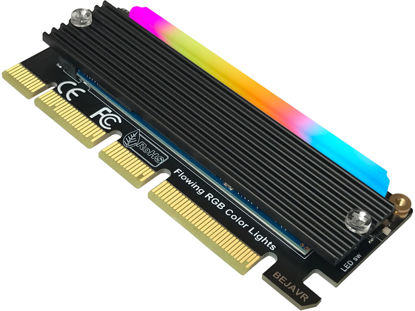
Bejavr M.2 PCIe NVMe Adapter SSD Expansion Card with RGB Light Bar and Aluminum Heatsink Solution, Supports PCI-Express 3.0 4.0 and X4 X8 X16 Slots.
RGB lights can be turned off or on manually via the on/off button of the M.2 PCIe Adapter Card. | RGB lighting is actively controlled by the NVMe PCIe Adapter's MCU chip, with alternating color changes during standby and flashing flow when the M.2 SSD reads and writes data. | PCIe M.2 Adapter Supports 2280/2260/2242/2230mm M.2 NVMe SSD. | PCIe NVMe Adapter Supports PCI-Express X4, X8, X16 slots. supports PCIe X4 full speed and is PCIe 4.0/3.0/2.0/1.0 compliant. | 【Question】: Can i boot off of the drive from this adapter ?【 Answer】: Usually not supported by older motherboards, it requires your motherboard to have a modern enough chipset to support booting from PCI Express M.2. Or consult your PC's motherboard manufacturer | M.2 PCIe Adapter Expansion Card supports Windows 11/10/8、Windows Server 2012 R2、Linux、Fedora、SUSE、Ubuntu、Red Hat(no driver required), NOTE : Additional NVMe driver required for Win7 and Windows Server 2008 R2. you may need to get an additional driver from your SSD's manufacturer. | NVMe PCIe Adapter Package Including : ❶ M.2 PCIe X16 Adapter x1 ❷ SSD Spare bolt x1(Pre-installed on PCB) ❸ Screw Driver x1 ❹ Heat conducting silica gel pad x2 (thick + thin) ❺ Aluminum heat sink x1 ❻ Spring-loaded nails for mounting heat sinks x2 ❼ Plastic bolts for mounting heat sinks x2
₹1,768.77
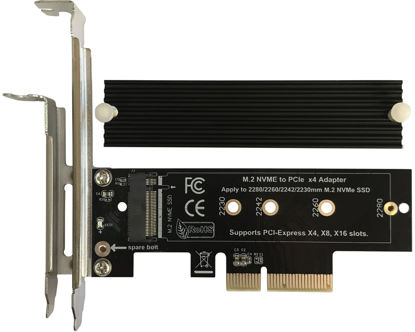
Bejavr M.2 NVME to PCIe 3.0/4.0 x4 Adapter, NVME/AHCI SSD to PCIe Expansion Card with Aluminum Heatsink Solution, Supports PCI-Express X4 X8 X16 Slots
NVMe PCIe Adapter Apply to 2280/2260/2242/2230mm M.2 NVMe and AHCI SSD, Adapter with Aluminum Heatsink Solution. | M.2 PCIe Adapter Supports PCI-Express X4, X8, X16 slots. PCIe 4.0 lanes with up to 64Gbps bandwidth, backward compatible with PCIe 1.0 2.0 3.0, Full release the speed of PCIE 3.0/4.0 X4 Full Speed M.2 PCIe SSD, such as 64Gbps M.2 PCIe 4.0 SSD. | PCIe NVMe Adapter Supports Windows 11/10/8、Windows Server 2012 R2、Linux、Fedora、SUSE、Ubuntu、Red Hat(no driver required) NOTE: Go to NVMe SSD manufacture website for driver installation if your PC can not recognize NVMe SSD. Win7 and Windows Server 2008 R2 need additional driver for NVMe SSD. | PCIe NVMe 3.0/4.0 x4 Adapter with 2 thermal pads, You put one between the ssd and the carrier and one between the ssd and the heat sink. | Package Including: ➤1-M.2 PCIe Adapter x1.➤2-SSD Spare bolt(Pre-installed on PCB).➤3-Low Profile Bracket x1.➤4-Screw Driver x1.➤5-Regular Profile Bracket x1.➤6-Heat conducting silica gel pad x2 (thick + thin).➤7-Aluminum Heatsink x1.➤8-Heatsink fixing spring nails x2.➤9-PCB fixing screws x2.➤10-Bracket fixing screws x1.
₹1,359.57
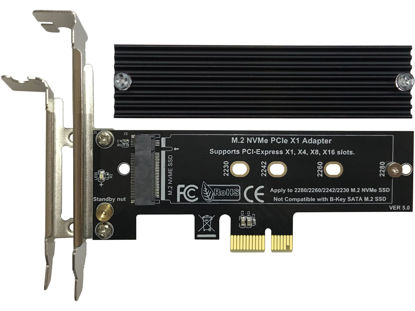
Bejavr M.2 PCIe NVMe X1 Adapter with Aluminum Heat Sink, Support PCIe 3.0 4.0 X1 X4 X8 X16 Slot.
M.2 PCIe Adapter Supports PCI-Express X1, X4, X8, X16 slots. | PCIe NVMe Adapter read and write speeds are only PCIe X1 bandwidth, no PCIe X4 bandwidth. Theoretical value: ▁▅▉PCIe 4.0 ~ 2GB/s, ▁▃▆PCIe 3.0 ~ 1GB/s, ▁▂▃PCIe 2.0 ~ 0.5GB/s. | NVMe PCIe Adapter Apply to 2280/2260/2242/2230mm M.2 NVMe and AHCI SSD. Not Compatible with B-Key SATA M.2 SSD. | PCIe M.2 Adapter Supports Windows 11/10/8、Windows Server 2012 R2、Linux、Fedora、SUSE、Ubuntu、Red Hat(No driver required). | M.2 to PCIe Adapter with (tall and short) 2 mounting brackets and aluminum heat sink. | The data read/write speed is CPU/PC motherboard/M.2 SSD related, e.g. which PCIe version does it support? For example, PCIe 2.0/3.0/4.0, the speed is limited by the lowest hardware configuration. | Usually older PC motherboards do not support booting a computer system from PCIe, and booting a system from M.2 requires a newer, more modern chipset to do this.
₹1,359.57
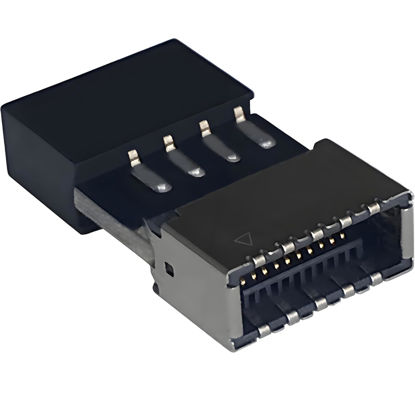
Bejavr USB 2.0 to USB 3.2 Gen 1 Header Adapter Front Panel Connector Motherboard USB 9Pin to Type-E/USB C
USB 2.0 to USB 3.2 Gen 1 header adapter, It converts USB 2.0 9Pin into a Type-E (Type-C) port. | USB 2.0 9Pin can be quickly converted into a front panel connector, extending the Front Panel USB C Hub. | Motherboard USB 9Pin to Type-C port converter, it does not need to be driven, plug and play. | USB 2.0 9Pin to 20-pin Type-E Key-A Header adapter. USB C port only supports the transfer rate of USB 2.0, which is the same as the rate of USB 2.0 of the motherboard 9pin. | This adapter is the perfect solution to use the USB 2.0 connector with TYPE-C or TYPE-A, It can be easily inserted into the motherboard USB 2.0 interface without additional accessories.
₹1,257.27
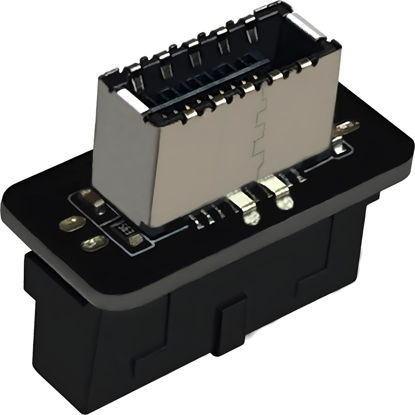
Bejavr USB 3.2 Gen 1 to USB 3.2 Gen 2 Header Adapter Front Panel Connector Motherboard 19Pin USB 3.0 to Type-E/USB C
USB 3.2 Gen 1 to USB 3.2 Gen 2 header adapter, It easily converts the motherboard's USB 3.0/3.1 19pin port into a Type-e USB C port. | Motherboard USB 3.0 to Type C adapter and front panel connector make it easy to expand your USB C hub. | Compatible with all of common motherboards with USB 3.0/3.1 19 pin header.(Note: Does not work with USB 2.0 header, USB 2.0 is a 9pin connector, and it is compatible with USB 2.0 to USB 3.2 Gen 1 header adapter.) | Easily expand the USB C port for your computer, Coverts 19-pin IDC USB 3.0/3.1 female port into 20-pin USB 3.2 E Type (A-Key) port for USB 3.2 Type-C or Type-A connector port capability. | Front panel connector adapter does not change the original transfer rate, it only changes the physical interface, and the transfer speed is still the same as the motherboard 19pin USB 3.0.
₹1,257.27
About us

Shop From Catalogue Of USA Bestsellers
Many times, we want to purchase products from USA simply because they are not available in India or the cost might be high. Generally, we think that the process of delivering the products from USA to India would be very expensive and complicated. But, now, you won't be disappointed, GetUSCart is here for you. Here, you can shop from catalogue of USA bestsellers.
Fast Shipping From USA To India - 7 To 10 Working Days
Are you in thought of shipping USA products to India will take much time? If your answer is yes, it’s absolutely not correct. GetUSCart is behind you to provide fast shipping from USA to India - 7 to 10 working days. GetUSCart is behind you to provide fast shipping from USA to India - 7 to 10 working days. Shop with GetUSCart and get shipped all your favorite products quickly from USA to India.


Low Shipping Cost From USA To India
You don't think about the shipping cost when you are buying USA products at GetUSCart. Literally, you will surprise when you see the shipping price on your ordered products. You can save more money with our low shipping cost from USA to India. Get all our products including beauty & personal care products, office products, toys, electronics and many others with less shipping charges.
No Hassles Of Custom Clearance In India
When items ship from USA to India, they have to go through customs before they will be released for final delivery. So, GetUSCart is responsible for all this custom clearance procedure for our products. We will pay custom duties, fees, taxes and etc. GetUSCart delivers your product without any issues regarding custom clearance.


Get Delivered Your Favourite Product From USA To Doorsteps In India
If you like the United States products, shop at GetUSCart whatever you need. And, get it delivered from USA to your own home in India with no stress. Simply place an order of your favorite products through our GetUSCart website or app. We will ship and deliver them from USA to India.
Don't Find A Product In Our Catalogue. Request A Product Now!
Find products whatever you want in our catalogue. We have various categories of products such as Electronics, Clothing, Shoes & Jewelry, Arts, Crafts & Sewing, Office Products, Toys & Games, Baby Products, Devices & Accessories, Kitchen & Dining, Cameras, Patio, Lawn & Garden, Musical Instruments, Beauty & Personal Care, etc. If you didn’t find your favorite product, you can request us by entering that product details.

K M Enterprises
Suite 311, AKM Dharma Rao Signature
Madinaguda, Hyderabad - 500049
email: [email protected]
All major credit, debit cards, net banking, wallets accepted securely
