







Cookies help us deliver our services. By using our services, you agree to our use of cookies.



Blapsuro
Blapsuro
Displayper page
Sort by
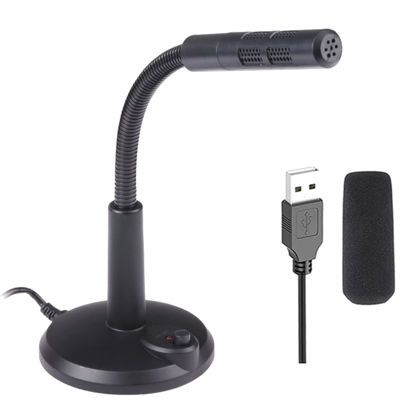
USB Computer Microphone,Plug and Play Desktop PC Laptop Microphone with Mute Button and LED Indicator for Streaming,Podcasting,Recording,Gaming,Skype,YouTube Mic for Mac or Window Black.
{Plug & Play(1.5M/5ft USB Cable)}-No Driver,Simply plug computer microphone into any available USB port,select it as your input in your software settings,and you're ready to create your own audio.Windows and Mac compatible. | {Advanced Microphone Smart Chip}-The computer microphone use updated CCS 2.0 chip to solve PoP sound quality problem and static noise problem to make your voice be more clear without any other sound. | {360 Degree Flexible Gooseneck Design}-Durable tube with metal material,PC microphone allows you to adjust the perfect angle,height or swivel to record your voice.The on/ off button setting of the steady wide stand allows you to fix the unexpected noise. | {Mute Button & Smart LED Indicator}-One-click to mute/unmute your microphone for Pc by a gentle touch,Build-in LED indicator tells you the working status at any time.So simple and convenient. | {Multifuncional & Unique Microphone}-This type of desktop microphone is good for network chatting,singing,home studio,gaming,Skype,Discord,Speech,Yahoo Recording,YouTube Recording,Google Voice Search,Steam,podcast and desktop recording.
₹1,655.22
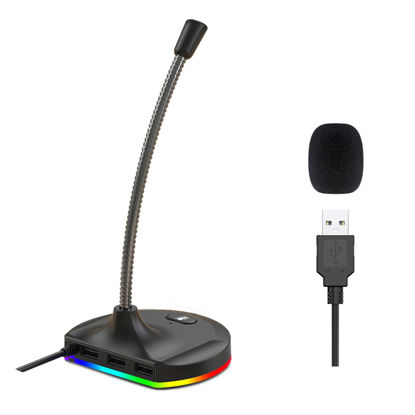
Blapsuro USB Microphone,Desktop Computer Mic with Mute Button and RGB Lighting,Plug&Play Condenser PC Laptop Mic,for Podcasting,Conference,Gaming,YouTube/Skype Mic for Mac/Window-Black-M8(3-Port Hub)
✅Intelligent Noise-Canceling Tech--Premium omnidirectional condenser microphone with noise-canceling technology can pick up your clear voice and reduce background noise and echo. | ✅{Mute Button & RGB LED Light}--One-click to mute/unmute your microphone for Pc by a gentle touch,Colorful RGB Breathing Light,It brings cool visual effect.The colorful RGB light can bring you richer using expedience.So simple and convenient. | ✅{The base is equipped with 3-Port USB2.0}--Convenient Connection Providing Data Transmission And Charging,USB devices are fully compatible,Can be directly connected to the device.Example:keyboard,mouse,camera Udisk,printer,handle,etc. | ✅{Plug & Play(1.5M/5ft USB Cable)}--built-in high quality sound card, no drivers to install,hassle-free installation,well compatible with Windows(7,8,10 and 11),Mac OS,and PS4.(NOT compatible with Raspberry Pi/Android). | ✅{360 Degree Position Adjustable Gooseneck Design}--Plug and play USB microphone Pick up the sound from 360-degree with high sensitivity,in the best possible location for sound to your PC gaming,dragon voice dictation,and talk to Cortana. | ✅{Multifuncional & Unique Microphone}--This type of desktop microphone is good for network chatting,singing,home studio,gaming,Skype,Discord,Speech,Yahoo Recording,YouTube Recording,Google Voice Search,Steam,podcast and desktop recording. | ✅{Important Tips}--(a)You can adjust the microphone volume in System Setting Panel. e.g for in Win 10: “Start”->“Settings”->"System”-> select “Sound” in the side bar -> choose “3-K8” as Input Device -> click “Device Properties” -> move the volume slider to 85-100. | ✅{Important Tips}--(b)Skype:“Option”->“Audio Device” -> select “3-K8”-> move the volume slider to 100.You can do similar settings on other systems & Apps.
₹1,625.55
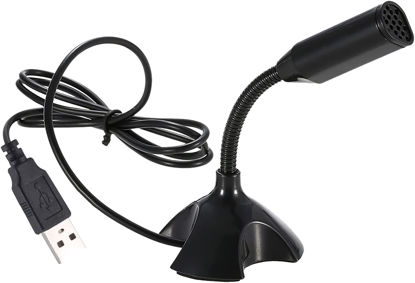
Mini USB Microphone for Desktop Computer and Laptop,Portable USB Condenser Mic With Adjustable Stand,Compatible with PC/Mac,Plug & Play,Ideal for Meeting,Online Class,Games,Remote work(Black)
[USB Computer Microphone with Advanced Chip]:This USB Microphone Build in Advaned Chip and filters out background noises and offers excellent sound quality for clear communication. | [Portable USB Microphone Widely Compatible]:USB plug Suitable for any models Desktop computer and Laptops with USB interface. | [Mini USB Microphone With 360°Flexible gooseneck]Creative design gooseneck is 360°adjustable to fit wherever it's needed. | [Computer USB Mic Microphone with Mutil-purpose]Plug is suitable for KTV,Internet chat,MSN,SKYPE,Network video conferencing,Network singing,Network recording,Computer games. | [External Computer Microphone Play & Plug]Professional network microphone Professional voice chat tool,Just Plug and play,No driver required,Portable and practical.
₹1,256.25
About us

Shop From Catalogue Of USA Bestsellers
Many times, we want to purchase products from USA simply because they are not available in India or the cost might be high. Generally, we think that the process of delivering the products from USA to India would be very expensive and complicated. But, now, you won't be disappointed, GetUSCart is here for you. Here, you can shop from catalogue of USA bestsellers.
Fast Shipping From USA To India - 7 To 10 Working Days
Are you in thought of shipping USA products to India will take much time? If your answer is yes, it’s absolutely not correct. GetUSCart is behind you to provide fast shipping from USA to India - 7 to 10 working days. GetUSCart is behind you to provide fast shipping from USA to India - 7 to 10 working days. Shop with GetUSCart and get shipped all your favorite products quickly from USA to India.


Low Shipping Cost From USA To India
You don't think about the shipping cost when you are buying USA products at GetUSCart. Literally, you will surprise when you see the shipping price on your ordered products. You can save more money with our low shipping cost from USA to India. Get all our products including beauty & personal care products, office products, toys, electronics and many others with less shipping charges.
No Hassles Of Custom Clearance In India
When items ship from USA to India, they have to go through customs before they will be released for final delivery. So, GetUSCart is responsible for all this custom clearance procedure for our products. We will pay custom duties, fees, taxes and etc. GetUSCart delivers your product without any issues regarding custom clearance.


Get Delivered Your Favourite Product From USA To Doorsteps In India
If you like the United States products, shop at GetUSCart whatever you need. And, get it delivered from USA to your own home in India with no stress. Simply place an order of your favorite products through our GetUSCart website or app. We will ship and deliver them from USA to India.
Don't Find A Product In Our Catalogue. Request A Product Now!
Find products whatever you want in our catalogue. We have various categories of products such as Electronics, Clothing, Shoes & Jewelry, Arts, Crafts & Sewing, Office Products, Toys & Games, Baby Products, Devices & Accessories, Kitchen & Dining, Cameras, Patio, Lawn & Garden, Musical Instruments, Beauty & Personal Care, etc. If you didn’t find your favorite product, you can request us by entering that product details.

K M Enterprises
Suite 311, AKM Dharma Rao Signature
Madinaguda, Hyderabad - 500049
email: [email protected]
All major credit, debit cards, net banking, wallets accepted securely
