







Cookies help us deliver our services. By using our services, you agree to our use of cookies.



EVATEK
EVATEK
Displayper page
Sort by
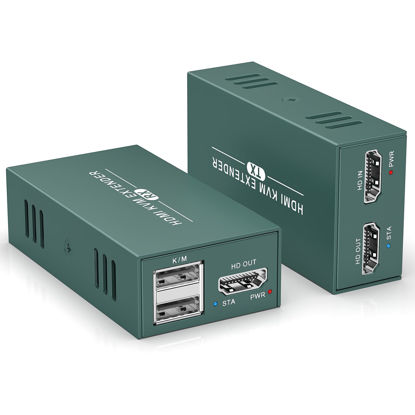
HDMI KVM Extender Over Cat6/7 Up to 50M(165ft), 1080P KVM Extender Over Ethernet with Loop Out Function,HDMI Transmitter Receiver Support Keyboard Mouse, POC Function Single Power Supply
【HDMI KVM Extender】 The receiver side of the KVM Extender is equipped with 2 USB ports for connecting keyboard and mouse for remote operation of a computer. You can efficiently control and manage computers from different locations, enhancing work flexibility and convenience. Please note that this KVM extender is USB version 1.1 and is not suitable for connecting cameras or other high load devices | 【50M Long Distance Transmission】This KVM over ethernet supports lossless HDMI signal transmission up to 50 meters (165 feet) via Cat6 cable, ensuring the clarity and stability of video signals over long distances. In addition to HD video, those KVM extender also supports real-time signal transmission of keyboard (K) and mouse (M) to meet the demand for remote control. For better experience, we recommend using Cat6 or Cat7 cable. | 【POC Single Side Power Supply】This KVM Extender over cat6 supports POC technology, easy to operate, just connect a power adapter on the RX side to support the whole device. The plug-and-play design allows you to quickly enable the KVM extender to connect monitors and peripherals, shortening setup time and reducing complicated installation processes. | 【Local Loop Out Function】 These KVM over ethernet not only features remote operation of computers, but also supports local loop-out of HDMI signals. You can connect a monitor directly to the transmitter (TX) for additional live video output. Whether you're operating remotely or monitoring locally via the KVM Extender, you can conveniently view and manage the video content of your sources in real time. | 【1080p@60Hz HD Picture Quality】This KVM Extender supports Support 1080P@60Hz, compliant with HDMI1.3 and HDCP1.2. and is backward compatible with 1080p@30Hz, 1080i, ect. You to enjoy a lossless, latency-free HD picture experience by KVM over ethernet. | 【Plug and Play Design】The KVM extender is designed to be simple, no need to install any driver, users can easily get started and quickly enjoy the convenience and fun brought by HD transmission, especially suitable for users who are not familiar with the technology. This KVM HDMI extender can be widely used in education, classroom, conference room,subway and many other scenarios.
₹5,451.57
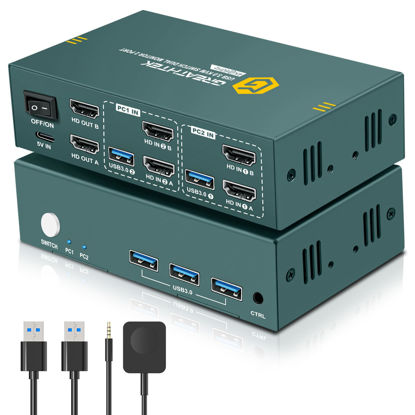
HDMI KVM Switch 2 Monitors 2 Computers 4K@60Hz, USB3.0 KVM Switch Dual Monitor with 3 USB 3.0 Ports Sharing Keyboard and Mouse, Printer/Scanner, Desktop Controller
【HDMI KVM Switch 2 Monitors 2 Computers】The KVM switch can maximize work efficiency. This KVM switch allows you to realize two PCs sharing two monitors and a set of keyboard and mouse. Control any computer at any time by key switch. Support extended mode and copy mode | 【Ultra HD 4K@60Hz 】These dual monitor KVM switch supports up to 3840*2160@60Hz and is backward compatible with 3D, 1080p and below. Support HDMI2.0 standard, HDCP2.2 ,maximum data rate 18Gbps. (Note:To achieve the highest resolution, you must ensure that both the source and the monitor, as well as the HDMI cable, support 4K@60Hz) | 【USB3.0 KVM Switch 】This dual monitor KVM switch 2 monitors 2 computers has 3 USB3.0 ports, providing up to 5Gbps data transfer speed, 10 times faster than USB2.0 transfer rate. Read faster and work more efficiently when sharing devices such as printers, cameras, scanners or USB flash drives between two computers | 【Two Switch Ways】The HDMI KVM switch support panel key and external wire controller switching. the button next to the indicator light enables one-touch switch, which is simple, fast and easy to use. With the wired extension button switching, you can place the dual monitor KVM switch outside the work area, making your desktop cleaner and tidier. (NOTE: Keyboard shortcuts (hotkeys) toggles are not supported) | 【Wide Range of Applications】This KVM switch 2 monitors 2 computers, plug and play, no driver required. It can be widely used in enterprises, offices, multimedia teaching, conference rooms, game rooms, research and testing scenarios | 【Important Notes】 1. Please make sure that the computer you connect to itself supports at least two monitors working at the same time. 2.Keep the cable wires properly connected (refer to the picture connection schematic). 3. If you have any problems when using the KVM switch, please contact our professional technical team for help, we provide 24 months replacement service for quality problems, so that you have no worries after the sale
₹6,474.57
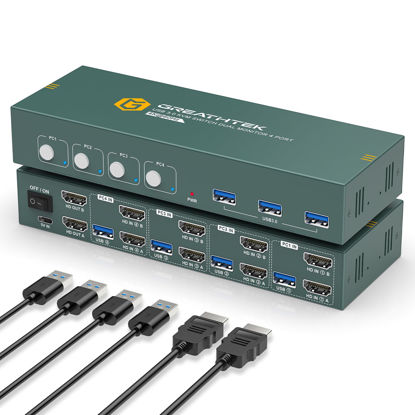
HDMI KVM Switch 4 Computers 2 Monitors 4K@60Hz,KVM Switch Dual Monitor with 3 USB 3.0 Ports Sharing Keyboard and Mouse, Printer/Scanner,KVM Switch 4 Computers
【HDMI KVM Switch 2 Monitors 4 Computers】This KVM switch 4 computers allows you to realize two PCs sharing two monitors and a set of keyboard and mouse. Control any computer at any time by key switch. Support extended mode and copy mode.The KVM switch can maximize work efficiency | 【4K@60Hz Ultra HD 】These KVM switch dual monitor supports up to 3840*2160@60Hz and is backward compatible with 3D, 1080p and below. Support HDMI2.0 standard, HDCP2.2 ,maximum data rate 18Gbps. (Note:To achieve the highest resolution, you must ensure that both the source and the monitor, as well as the HDMI cable, support 4K@60Hz) | 【USB3.0 KVM Switch 4 Computers 2 Monitors】This dual monitor KVM switch 2 monitors 4 computers has 3 USB3.0 ports, providing up to 5Gbps data transfer speed, 10 times faster than USB2.0 transfer rate. Read faster and work more efficiently when sharing devices such as printers, cameras, scanners or USB flash drives between two computers | 【Buttons switch 】1.Buttons switch: the button next to the indicator light enables one-touch switch. Switching speed is only 2-4 seconds. Very convenient and fast. | 【Wide Range of Applications】This KVM switch 4 computers dual monitor , plug and play, no driver required. Can be applied to a variety of use scenarios, such as enterprises, offices, multimedia teaching, meeting rooms, etc. | 【Important Notes】 1. Please make sure that the computer you connect to itself supports at least two monitors working at the same time. 2.Keep the cable wires properly connected (refer to the picture connection schematic). 3. If you have any problems when using the KVM switch, please contact our professional technical team for help, we provide 24 months replacement service for quality problems, so that you have no worries after the sale
₹14,924.55
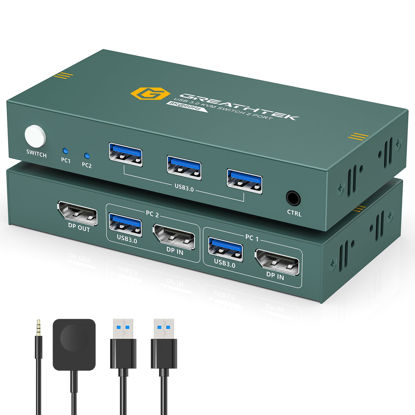
KVM Switch 1 Monitors 2 Computers Displayport 8K@60Hz, USB3.0 KVM Switch Displayport with 3 USB 3.0 Ports EDID Adaptive Sharing Mouse Keyboard and Monitor Plug and Play
【KVM Switch 1 Monitors 2 Computers 】 This KVM switch displayport is simple and practical, only a set of keyboard and mouse can easily control two computers and share one monitor, effectively saving office space and significantly improve work efficiency. It greatly enhances the convenience and efficiency of multi-computer operation in different scenarios such as security monitoring, multimedia classrooms, conference rooms, game rooms, as well as research and testing | 【8K@60Hz Ultra HD 】 This KVM switch displayport delivers an exceptional visual experience by supporting resolutions up to 8K@60Hz and is backward compatible with a wide range of resolutions including 8K@30Hz,4K@144Hz and 4K@60Hz, ensuring clear, vivid, high-quality images in different application scenarios | 【USB3.0 KVM Switch 1 Monitors 2 Computers 】This KVM switch displayport is equipped with 3 high-speed USB 3.0 ports, which facilitates efficient management of multiple USB devices. These KVM switch supports various systems, such as Windows 10/8/8.1/7, Chrome OS and Linux systems for a variety of application environment | 【Button Switch and Desktop Controller】This displayport KVM switch 1 monitors 2 computers offers two convenient switching methods: push button and desktop controller. The desktop controller is designed to be user-friendly and easy to operate, and can hide the device to ensure a tidy desktop. Those kvm switch displayport is plug-and-play, easy to install and use, and requires no complicated setup. Perfect for mobile teaching, office crowds and gamers.(Note that the device does not support switching via hotkeys) | 【Warm Tips】1. The KVM switch display port does not support the use of ultra-wide screen/ergonomic keyboards. 2. Please make sure that your computer has at least one DP port. When using this DP KVM switch, we do not recommend the use of adapters, adapter cables, docking stations, etc. 3. During the switching process, the signal source will re-recognize the monitor information, so the re-recognition and layout of the monitor window is normal(Please note that the KVM switch does not come with DP cables)
₹5,451.57
About us

Shop From Catalogue Of USA Bestsellers
Many times, we want to purchase products from USA simply because they are not available in India or the cost might be high. Generally, we think that the process of delivering the products from USA to India would be very expensive and complicated. But, now, you won't be disappointed, GetUSCart is here for you. Here, you can shop from catalogue of USA bestsellers.
Fast Shipping From USA To India - 7 To 10 Working Days
Are you in thought of shipping USA products to India will take much time? If your answer is yes, it’s absolutely not correct. GetUSCart is behind you to provide fast shipping from USA to India - 7 to 10 working days. GetUSCart is behind you to provide fast shipping from USA to India - 7 to 10 working days. Shop with GetUSCart and get shipped all your favorite products quickly from USA to India.


Low Shipping Cost From USA To India
You don't think about the shipping cost when you are buying USA products at GetUSCart. Literally, you will surprise when you see the shipping price on your ordered products. You can save more money with our low shipping cost from USA to India. Get all our products including beauty & personal care products, office products, toys, electronics and many others with less shipping charges.
No Hassles Of Custom Clearance In India
When items ship from USA to India, they have to go through customs before they will be released for final delivery. So, GetUSCart is responsible for all this custom clearance procedure for our products. We will pay custom duties, fees, taxes and etc. GetUSCart delivers your product without any issues regarding custom clearance.

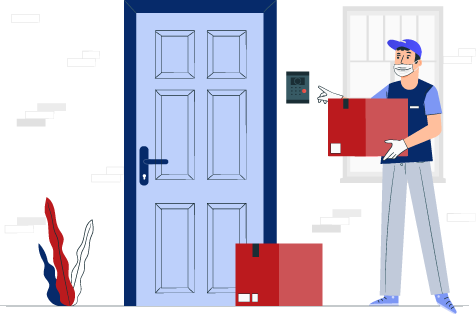
Get Delivered Your Favourite Product From USA To Doorsteps In India
If you like the United States products, shop at GetUSCart whatever you need. And, get it delivered from USA to your own home in India with no stress. Simply place an order of your favorite products through our GetUSCart website or app. We will ship and deliver them from USA to India.
Don't Find A Product In Our Catalogue. Request A Product Now!
Find products whatever you want in our catalogue. We have various categories of products such as Electronics, Clothing, Shoes & Jewelry, Arts, Crafts & Sewing, Office Products, Toys & Games, Baby Products, Devices & Accessories, Kitchen & Dining, Cameras, Patio, Lawn & Garden, Musical Instruments, Beauty & Personal Care, etc. If you didn’t find your favorite product, you can request us by entering that product details.

K M Enterprises
Suite 311, AKM Dharma Rao Signature
Madinaguda, Hyderabad - 500049
email: [email protected]
All major credit, debit cards, net banking, wallets accepted securely
