







Cookies help us deliver our services. By using our services, you agree to our use of cookies.



Ojguct
Ojguct
Displayper page
Sort by
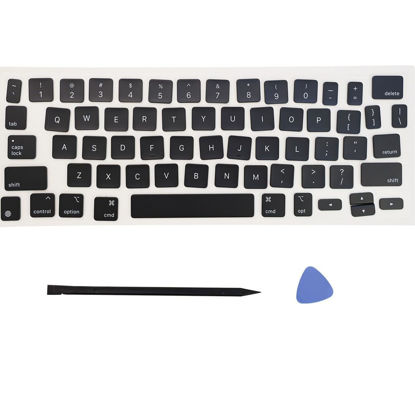
Replacement US Keyboard Full Set of Keycap Keys and Tool Applicable for ipad Pro/Air 11/13“ Magic keyboard (MKH-1)
[Package]: 1 set of US version key caps(This isn't a keyboard.) +2PCS tool (Crowbar+ triangle flake) | [Applicable model]: Applicable for ipad Pro/Air 11/13“ Magic keyboard (The 2/3 generation product) Replace key cap | NOTE:Please make sure that your Keyboard model number matches the compatible of this product (The appearance of key caps is consistent) | [Installation Tips]:Use the tool to pry off the bottom of the key cap, that is, remove the old key cap (large key cap, you can pry off slowly from left to right), and then directly install the new keycap. Be careful not to install the keycap in the wrong direction. (If you do not have experience, it is recommended to find videos on the Internet to learn, and then operate)
₹3,099.69
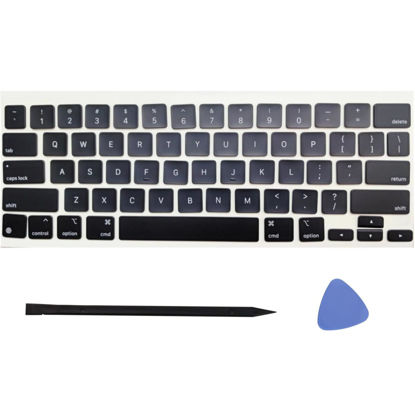
Ojguct Replacement US Keyboard Full Set of Keycap Keys and Tool Applicable for ipad Pro/Air 11/13“ Magic keyboard (MKB-4)
[Package]: 1 set of US version key caps(This isn't a keyboard.) +2PCS tool (Crowbar+ triangle flake) | [Applicable model]: Applicable for ipad Pro/Air 11/13“ Magic keyboard (The 2/3 generation product) Replace key cap | NOTE:Please make sure that your Keyboard model number matches the compatible of this product (The appearance of key caps is consistent) | [Installation Tips]:Use the tool to pry off the bottom of the key cap, that is, remove the old key cap (large key cap, you can pry off slowly from left to right), and then directly install the new keycap. Be careful not to install the keycap in the wrong direction. (If you do not have experience, it is recommended to find videos on the Internet to learn, and then operate)
₹3,099.69
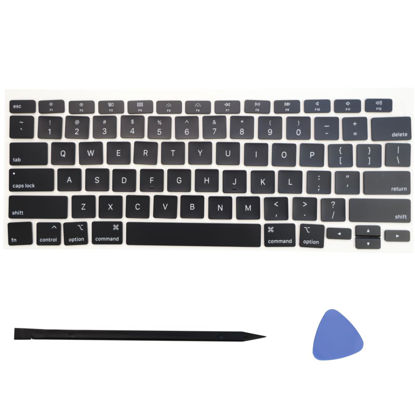
Replacement Keyboard Full Set of Keycaps Keys and Tool Fit for MacBook Air 13.3" Model A2179 MWTJ2LL/A MVH22LL/A MWTL2LL/A EMC 3302 Model A2337 MGN63LL/A MGN73LL/A(M1) EMC 3598 2020 Year (A2179)
Package: 1 set of US version key caps and 2PCS tool (Crowbar and triangle flake) | Applicable model:Model A2179 MB Air 13.3" Early 2020(EMC 3302) MWTJ2LL/A MVH22LL/A BTO/CTO | Applicable model:Model A2337 MB Air 13.3" Late 2020(EMC 3598) MGN63LL/A MGN73LL/A(M1) | Note:Please make sure that your computer model number matches the compatible model of this product (the model number can be found on the metal case at the bottom of the computer, such as A2179) | Installation Tips:Use the tool to pry off the bottom of the key cap, that is, remove the old key cap (large key cap, you can pry off slowly from left to right), and then directly install the new keycap. Be careful not to install the keycap in the wrong direction. ( it is recommended to find videos on the Internet to learn, and then operate)
₹1,800.48
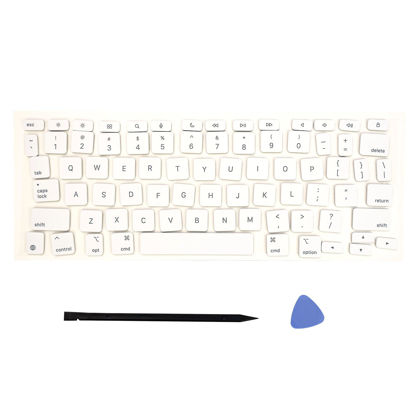
Replacement US Keyboard Full Set of Keycap Keys and Tool Applicable for ipad Pro/Air 11/13“ Magic keyboard (MKB-1)
[Package]: 1 set of US version key caps(This isn't a keyboard.) +2PCS tool (Crowbar+ triangle flake) | [Applicable model]: Applicable for ipad Pro/Air 11/13“ Magic keyboard (The 2/3 generation product) Replace key cap | NOTE:Please make sure that your Keyboard model number matches the compatible of this product (The appearance of key caps is consistent) | [Installation Tips]:Use the tool to pry off the bottom of the key cap, that is, remove the old key cap (large key cap, you can pry off slowly from left to right), and then directly install the new keycap. Be careful not to install the keycap in the wrong direction. (If you do not have experience, it is recommended to find videos on the Internet to learn, and then operate)
₹3,099.69
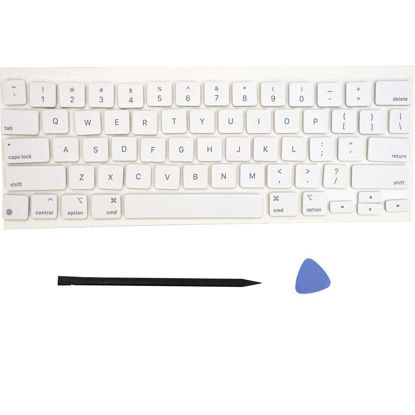
Replacement US Keyboard Full Set of Keycap Keys and Tool Applicable for ipad Pro/Air 11/13“ Magic Keyboard (MKB-3)
Package: 1 set of US version key caps and 2PCS tool (Crowbar and triangle flake) | Applicable model: Applicable for ipad Pro/Air 11/12.9“ Magic keyboard (The 2/3 generation product) Replace key cap | NOTE:Please make sure that your Keyboard model number matches the compatible of this product (The appearance of key caps is consistent) | Installation Tips:Use the tool to pry off the bottom of the key cap, that is, remove the old key cap (large key cap, you can pry off slowly from left to right), and then directly install the new keycap | Be careful not to install the keycap in the wrong direction., it is recommended to find videos on the Internet to learn, and then operate
₹3,099.69
About us

Shop From Catalogue Of USA Bestsellers
Many times, we want to purchase products from USA simply because they are not available in India or the cost might be high. Generally, we think that the process of delivering the products from USA to India would be very expensive and complicated. But, now, you won't be disappointed, GetUSCart is here for you. Here, you can shop from catalogue of USA bestsellers.
Fast Shipping From USA To India - 7 To 10 Working Days
Are you in thought of shipping USA products to India will take much time? If your answer is yes, it’s absolutely not correct. GetUSCart is behind you to provide fast shipping from USA to India - 7 to 10 working days. GetUSCart is behind you to provide fast shipping from USA to India - 7 to 10 working days. Shop with GetUSCart and get shipped all your favorite products quickly from USA to India.


Low Shipping Cost From USA To India
You don't think about the shipping cost when you are buying USA products at GetUSCart. Literally, you will surprise when you see the shipping price on your ordered products. You can save more money with our low shipping cost from USA to India. Get all our products including beauty & personal care products, office products, toys, electronics and many others with less shipping charges.
No Hassles Of Custom Clearance In India
When items ship from USA to India, they have to go through customs before they will be released for final delivery. So, GetUSCart is responsible for all this custom clearance procedure for our products. We will pay custom duties, fees, taxes and etc. GetUSCart delivers your product without any issues regarding custom clearance.


Get Delivered Your Favourite Product From USA To Doorsteps In India
If you like the United States products, shop at GetUSCart whatever you need. And, get it delivered from USA to your own home in India with no stress. Simply place an order of your favorite products through our GetUSCart website or app. We will ship and deliver them from USA to India.
Don't Find A Product In Our Catalogue. Request A Product Now!
Find products whatever you want in our catalogue. We have various categories of products such as Electronics, Clothing, Shoes & Jewelry, Arts, Crafts & Sewing, Office Products, Toys & Games, Baby Products, Devices & Accessories, Kitchen & Dining, Cameras, Patio, Lawn & Garden, Musical Instruments, Beauty & Personal Care, etc. If you didn’t find your favorite product, you can request us by entering that product details.

K M Enterprises
Suite 311, AKM Dharma Rao Signature
Madinaguda, Hyderabad - 500049
email: [email protected]
All major credit, debit cards, net banking, wallets accepted securely
