







Cookies help us deliver our services. By using our services, you agree to our use of cookies.



PenPower
PenPower
Displayper page
Sort by
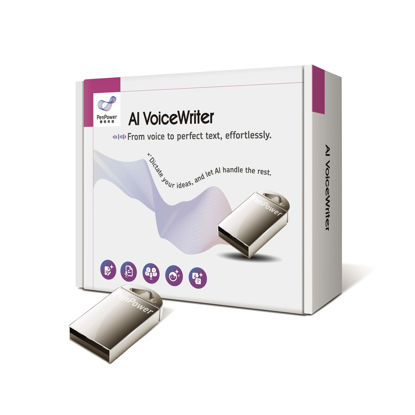
AI VoiceWriter - Speech-to-Text Transcription Solution for Win/Mac, A USB Dongle & Mobile App for Voice Recognition, AI Proofreading and Rewriting, AI Assistive Creation, Voice Typing to Applications
[VOICE-TYPING] - Our advanced voice typing solution delivers instant proofreading and rewriting for error-free content, every time. Our mobile app and dongle to write on PCs without a pause. | [AI ASSISTIVE CREATION] - Enhance your efficiency in surprising ways for content creation and refinement! Ideal for office workers, students, writers, journalists, administrative staff, and more. | [TEXT INPUT TO] - Directly input text into applications like MS Word, PowerPoint, Email, Facebook, WhatsApp, and more. Enhance your productivity at work. | [AI REWRITING] - Help you polish your content and save time, it also assists in rewriting and rephrasing your content into professional formats, bullet points, and more, tailored to your audience. | [AI ASSITIVE TRANSLATION] - Real-time translation for messages, breaking down language barriers! Type in your native language and translate to three target languages in real time.
₹7,497.57
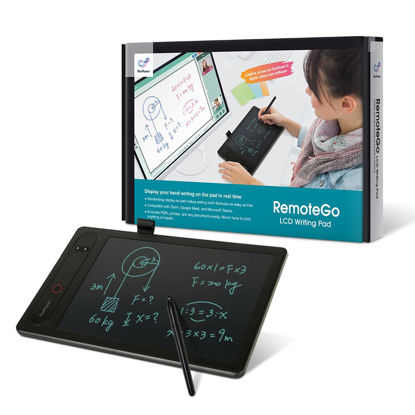
PenPower RemoteGo LCD Writing Pad | LCD Panel | Visible Handwriting | Video & Voice Comment on PDF | Annotation, Screen Recording and Math Formula Recognition | Pen Tablet for Adults
CLEAR AND FINE-LINE HANDWRITING - Write and visualize your handwriting on the LCD pad in real-time to enhance your teaching quality and bring extra productivity to remote teaching. | NATIVE INTEGRATION WITH VIDEO CONFERENCING - Zoom, Google Meet, MS Teams, Webex, on both Windows and Mac | DRAG AND DROP HANDWRITINGS - save your handwriting with reusable sticky notes, and “drag and drop” the handwriting anywhere such as Messenger, WhatsApp, and Skype. | ANNOTATE - Annotate live on the screen with built-in brushes and highlighters on websites, digital documents, applications, videos, and any application on PC or a tablet. Annotation can also be saved using the built-in video record feature or taking a screenshot. | SCREENSHOT AND EXPLAIN - Take a screenshot of a question and import it to the built-in digital whiteboard. From there, you can start annotating with the question in the background - best for math, physics, or anything that requires detailed explanation. | VIDEO RECORDING - The built-in Webcam shortcut can simultaneously record your facial expression for higher engagement.
₹10,802.88
About us

Shop From Catalogue Of USA Bestsellers
Many times, we want to purchase products from USA simply because they are not available in India or the cost might be high. Generally, we think that the process of delivering the products from USA to India would be very expensive and complicated. But, now, you won't be disappointed, GetUSCart is here for you. Here, you can shop from catalogue of USA bestsellers.
Fast Shipping From USA To India - 7 To 10 Working Days
Are you in thought of shipping USA products to India will take much time? If your answer is yes, it’s absolutely not correct. GetUSCart is behind you to provide fast shipping from USA to India - 7 to 10 working days. GetUSCart is behind you to provide fast shipping from USA to India - 7 to 10 working days. Shop with GetUSCart and get shipped all your favorite products quickly from USA to India.


Low Shipping Cost From USA To India
You don't think about the shipping cost when you are buying USA products at GetUSCart. Literally, you will surprise when you see the shipping price on your ordered products. You can save more money with our low shipping cost from USA to India. Get all our products including beauty & personal care products, office products, toys, electronics and many others with less shipping charges.
No Hassles Of Custom Clearance In India
When items ship from USA to India, they have to go through customs before they will be released for final delivery. So, GetUSCart is responsible for all this custom clearance procedure for our products. We will pay custom duties, fees, taxes and etc. GetUSCart delivers your product without any issues regarding custom clearance.


Get Delivered Your Favourite Product From USA To Doorsteps In India
If you like the United States products, shop at GetUSCart whatever you need. And, get it delivered from USA to your own home in India with no stress. Simply place an order of your favorite products through our GetUSCart website or app. We will ship and deliver them from USA to India.
Don't Find A Product In Our Catalogue. Request A Product Now!
Find products whatever you want in our catalogue. We have various categories of products such as Electronics, Clothing, Shoes & Jewelry, Arts, Crafts & Sewing, Office Products, Toys & Games, Baby Products, Devices & Accessories, Kitchen & Dining, Cameras, Patio, Lawn & Garden, Musical Instruments, Beauty & Personal Care, etc. If you didn’t find your favorite product, you can request us by entering that product details.

K M Enterprises
Suite 311, AKM Dharma Rao Signature
Madinaguda, Hyderabad - 500049
email: [email protected]
All major credit, debit cards, net banking, wallets accepted securely
